
How to use the NHS Audit map
The Map Pop-Up
When you click on one of the trust markers on the map, you will get a pop-up box that looks like this:
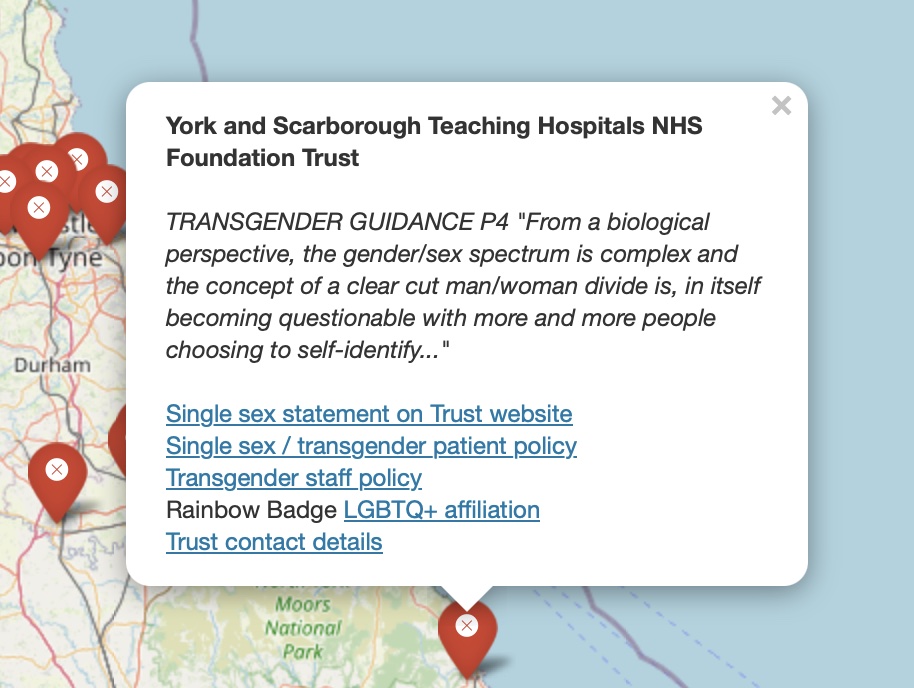
The parts of this pop-up are:
1) Name of the trust
2) A quotation from one of the trust’s internal policy documents relating to single-sex/transgender patients or staff
3) A link to an archived copy of the single-sex accommodation statement from the trust’s public website, if this exists.
- To view this statement, you may need to click through further links on the trust’s webpage.
Look for the following words or phrases: Your bed / Privacy / Dignity / Same-sex / Single-sex / Eliminating mixed-sex
4) and 5) Links to archived copies of the trust’s internal policy documents on: (4) single-sex/transgender accommodation for patients, and (5) transgender staff, if these policies exist.
- Some of these policy documents are very long, and you may have to read them carefully to find what you are looking for. The patient accommodation policies, in particular, can initially look like they confirm that the trust will maintain actual single-sex spaces.
- The sections of these documents that cover allowing transgender patients and staff to use spaces that match their gender identity rather than their sex can be found by searching for the terms: trans / transgender / gender / gender reassignment. Some will be in Annexes to the main document.
- If a trust has replied to a Freedom Of Information (FOI) request that they do not have one or both of these policies, the map link will take you to a record of the trust response.
6) A link to archived evidence of a link between the trust and LGBTQ+ advocacy groups such as Stonewall, Rainbow Badges, etc.
7) Link to contact information for the trust.
Why archives?
We have linked to archive versions of trust pages and polices so that these will always be available for the public to see, even if the trust changes their website or withdraws their policies. We have used two main archive facilities:
- The Wayback Machine (WBM): https://web.archive.org/, for information available on trust websites (and trust affiliated Facebook/LinkedIn/etc pages),
- What Do They Know (WDTK): https://www.whatdotheyknow.com/, for trust responses to Freedom Of Information (FOI) requests.
Sometimes for technical reasons we were unable to archive a website or policy. In most of these cases we have a pdf of the document or webpage, in which case we have linked directly to this pdf.
Dates of archival and further information
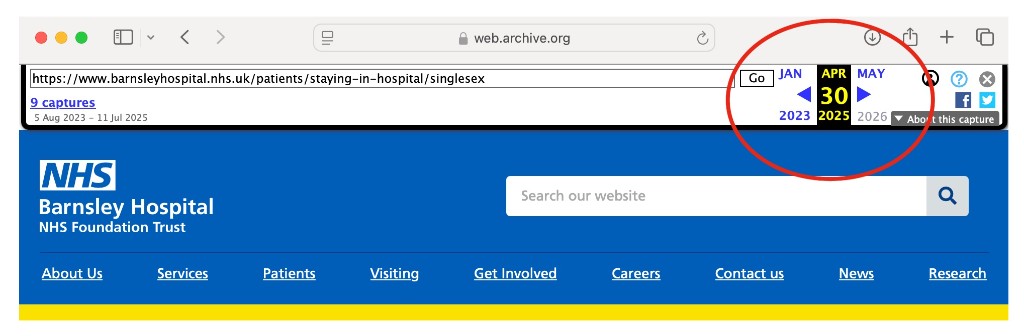
On TheWaybackMachine, you can find the date the page was archived on the top right, as indicated below:
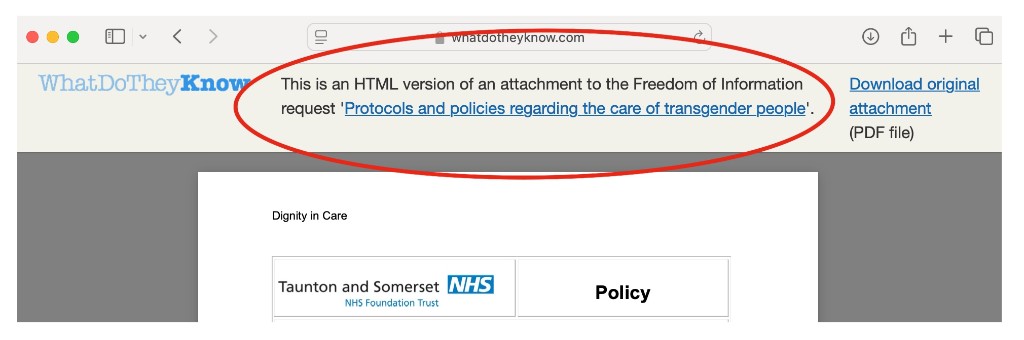
On WhatDoTheyKnow, you can find the date that the FOI request was submitted/responded to, as well as any other correspondence about that request by clicking on the link at the top middle, as indicated below. Note that sometimes you will have to click on “Show quoted sections” or “Show all attachments” to see all the details:
For pdf documents, these were all downloaded and saved between February and July 2025.
Where there are no trust-level policies, you must assume that the trust is making use of one of these two policies:
-
NHS England 2019 Guidance: Delivering same-sex accommodation
https://web.archive.org/web/20251006050906/https://www.england.nhs.uk/long-read/delivering-same-sex-accommodation/ -
NHS Confederation LGBTQ+ Leaders Network: Leading for all: Supporting trans and non-binary healthcare staff
https://web.archive.org/web/20250420094904/https://www.nhsconfed.org/system/files/2023-09/Leading-for-all-supporting-trans-non-binary-healthcare-staff-Sept-23.pdf